80s Look AI Video: Easy Cinematic Retro Reel Guide
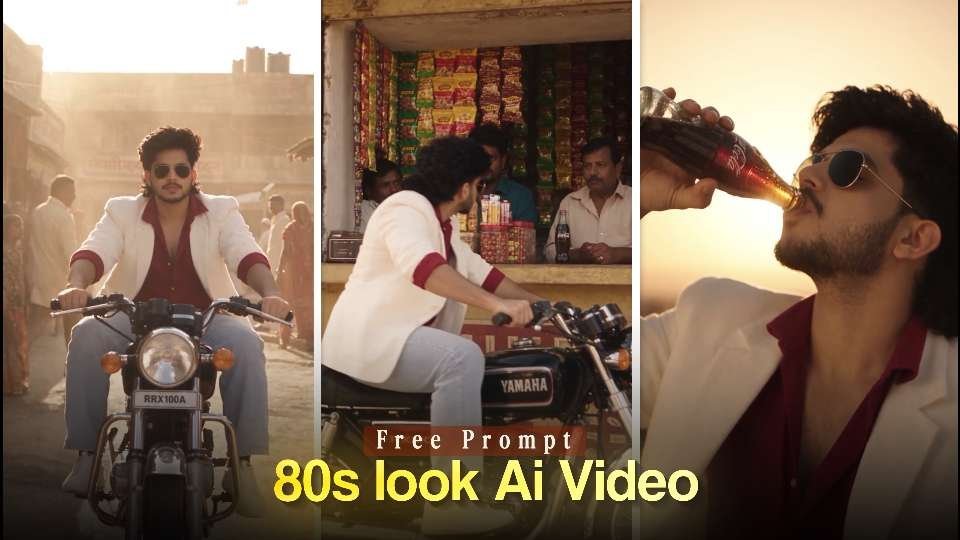
An 80s look AI video turns an ordinary portrait into a short cinematic memory filled with warm sunlight, vintage fashion, old streets, and analog film character. Instead of presenting a polished modern clip, this style makes the viewer feel as if the footage came from a classic Indian movie or a forgotten home video.
The appeal comes from the contrast between a familiar face and a completely different era. With the right source photo, visual direction, and editing choices, you can create a nostalgic Instagram Reel that feels personal, atmospheric, and made for sharing.
Why the 80s look AI video trend works
The 80s look AI video trend combines nostalgia with fast-moving social content. Viewers recognize details such as oversized jackets, high-waisted trousers, motorcycles, faded shopfronts, glass soda bottles, and aviator sunglasses. These details create an immediate time-travel effect without requiring a complicated story.
Read Also: Cinematic Instagram Reel Editing: Easy Viral Style Guide | Ganpati Bappa VN Code: Easy Instagram Reel Guide
An effective 80s look AI video also benefits from cinematic contrast. Golden highlights, dusty shadows, soft focus, and restrained saturation give the footage an aged character, while subtle camera movement keeps it engaging on a phone screen. The result feels more like a scene than a simple filter.
There is also an emotional reason this format performs well. Retro imagery suggests adventure, romance, freedom, and a slower pace of life. When the subject remains recognizable, the video becomes a playful version of the creator’s own history, even if the original photo was taken recently.
Core ingredients of a cinematic vintage Instagram Reel
A convincing retro AI video depends on consistency. The clothes, location, lighting, vehicle, and color treatment should all appear to belong to the same period. If one element looks too modern, the illusion becomes less believable.
- Warm color grading: Use amber sunlight, muted greens, dusty browns, cream tones, and gentle reds instead of bright digital colors.
- Period styling: Choose simple retro shirts, scarves, blazers, classic trousers, leather shoes, or sunglasses that support the era without overwhelming the subject.
- Recognizable locations: Old markets, narrow lanes, roadside stalls, traditional storefronts, and quiet suburban streets provide strong visual context.
- Analog texture: Fine film grain, mild halation, soft contrast, and natural motion blur can make generated footage feel less synthetic.
- Controlled movement: Slow tracking shots, gentle push-ins, and low-angle motion often look more realistic than rapid transitions.
For historical context, a quick look at this overview of 1980s culture can help you notice the clothing, vehicles, colors, and design cues associated with the decade.
Prepare a photo for AI photo-to-video editing
The starting image has a major effect on identity preservation and motion quality. Select a sharp portrait where the face is unobstructed and the lighting is even. A three-quarter or full-body image may work especially well when the final scene includes walking, riding, or interacting with an object.
- Use a high-resolution image with clear facial features.
- Avoid heavy beauty filters, extreme shadows, and strong reflections over the face.
- Keep hair, skin tone, and body proportions visible enough for the tool to follow.
- Choose a simple background if you want the generated location to become the main visual focus.
- Crop with the final format in mind, especially when creating a vertical 9:16 Reel.
Before generating the clip, decide what should stay unchanged. Identity, facial structure, skin tone, and general body shape should remain stable, while clothing, surroundings, camera angle, and period atmosphere can be transformed. This distinction helps prevent the result from looking like a different person.
Riding Through a Dusty Indian Bazaar
This opening section establishes movement, location, and the retro mood. It works best when the supplied image clearly shows the subject and when the chosen motorcycle or vehicle can remain consistent across the shot.
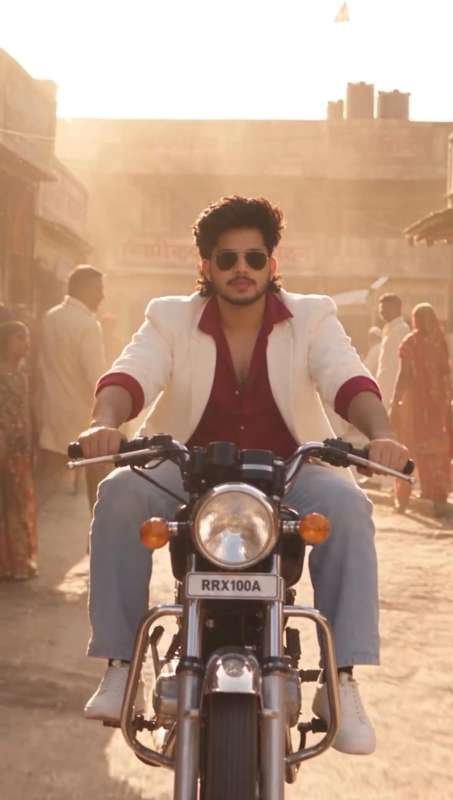
Check the face, hands, vehicle shape, and direction of travel before moving on. If the motion feels too fast, reduce the intensity of the camera movement or regenerate with a simpler background.
Vintage Shop Arrival and Bottle Close-Up
This continuation shifts the energy from travel to character performance. It gives the subject a natural action at the destination, which makes the final Reel feel like a short scene instead of a collection of disconnected effects.
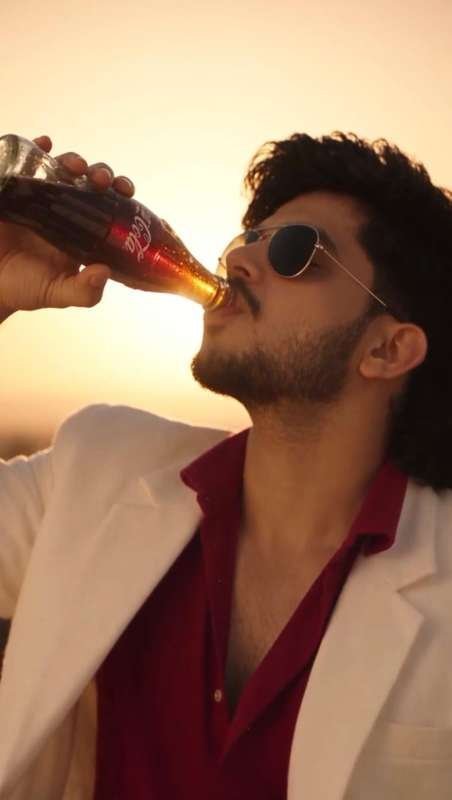
Match the lighting and wardrobe from the previous clip during export. A short crossfade or a clean action cut can hide small transitions while preserving the feeling of continuous movement.
Make the retro AI video look natural
Generation alone does not guarantee realism. AI video can produce unstable fingers, drifting facial features, changing clothing, or objects that shift between frames. Careful preparation and selective editing are the best ways to reduce these problems.
Keep the action simple and give the subject one clear goal in each moment. Riding forward, turning toward a shop, lifting a bottle, or adjusting sunglasses is easier to render convincingly than several complicated actions at once.
- Protect facial continuity: Use the same reference image and repeat important identity instructions when extending a sequence.
- Limit background clutter: A few strong environmental details are more convincing than a crowded scene filled with tiny signs and moving people.
- Use believable camera logic: Match the camera angle to the action so the subject’s motion and perspective agree.
- Review every frame: Look for warped hands, duplicate objects, unnatural shadows, or sudden changes in facial expression.
- Keep texture subtle: Film grain should support the image, not cover defects or make the video look heavily processed.
A cinematic vintage video should still feel clean enough for modern mobile viewing. Apply texture after the main generation and keep the effect light. The best result balances aged character with clear eyes, readable movement, and a stable subject.
Plan scenes for a vintage Instagram Reel
A strong Reel usually follows a simple visual progression: introduce the subject, show a journey or movement, reveal the setting, and end with a memorable gesture. This structure gives viewers a reason to keep watching while allowing the retro details to appear naturally.
| Scene purpose | Visual direction | Editing benefit |
|---|---|---|
| Opening hook | Close detail of a shoe, handlebar, sign, or passing street | Creates curiosity immediately |
| Movement | Tracking view of the subject traveling through an old neighborhood | Adds energy and scale |
| Character reveal | Medium shot with a confident expression and clear period styling | Strengthens identity and personality |
| Final gesture | A drink, glance, sunglasses adjustment, or relaxed pose | Provides a memorable ending |
Use a strong visual in the first second because viewers decide quickly whether to continue. Close-ups of texture and motion can create a better hook than beginning with a wide, static shot. Once attention is secured, reveal the wider environment and let the story breathe.
Edit and publish a cinematic Instagram Reel
After generation, assemble the clips in a mobile editor or desktop timeline. Trim pauses, remove unstable frames, and choose transitions that support the story. Hard cuts often suit energetic travel footage, while a brief dissolve can work when changing from a street scene to an interior location.
Music should reinforce the period without competing with the visuals. Look for an instrumental groove, vintage percussion, soft guitar, or an officially licensed track with a warm analog character. Always check the current Instagram publishing tools and music permissions before posting.
- Export vertically at high quality so small details remain visible.
- Keep the opening frame visually strong and avoid long blank introductions.
- Add a short caption that explains the nostalgic concept without describing every effect.
- Use a few relevant hashtags related to retro cinema, AI video, vintage fashion, and Indian street style.
- Compare watch time and replays to learn which opening shots hold attention best.
Avoid adding too many overlays, stickers, or modern interface elements. The retro illusion works because the viewer can stay inside the scene. Let the color, movement, wardrobe, and setting carry most of the storytelling.
FAQ: 80s look AI video questions
What is an 80s look AI video?
It is an AI-generated video that transforms a modern photo or clip into a stylized scene inspired by 1980s cinema and visual culture. Common elements include warm light, vintage clothing, analog grain, old streets, classic vehicles, and expressive camera movement.
How do I make an 80s look AI video from one photo?
Start with a clear reference image, describe the desired identity protection and period setting, then generate a short vertical sequence. Review the output for facial and hand consistency before combining the best sections in a video editor.
What photo works best for a retro AI video?
A sharp image with visible eyes, natural lighting, and an unobstructed face is usually the strongest choice. Full-body or three-quarter images are useful when the scene requires walking, riding, or interacting with a prop.
How can I make a vintage Instagram Reel look realistic?
Use consistent clothing, lighting, location, and identity instructions across connected clips. Keep actions straightforward, add restrained film grain, and remove frames with unstable hands, changing objects, or unnatural shadows.
Leave a Reply